
File Configuration
You can use the “file” menu or buttons on the “Configuration File Operating Zone” to manage the configuration results.
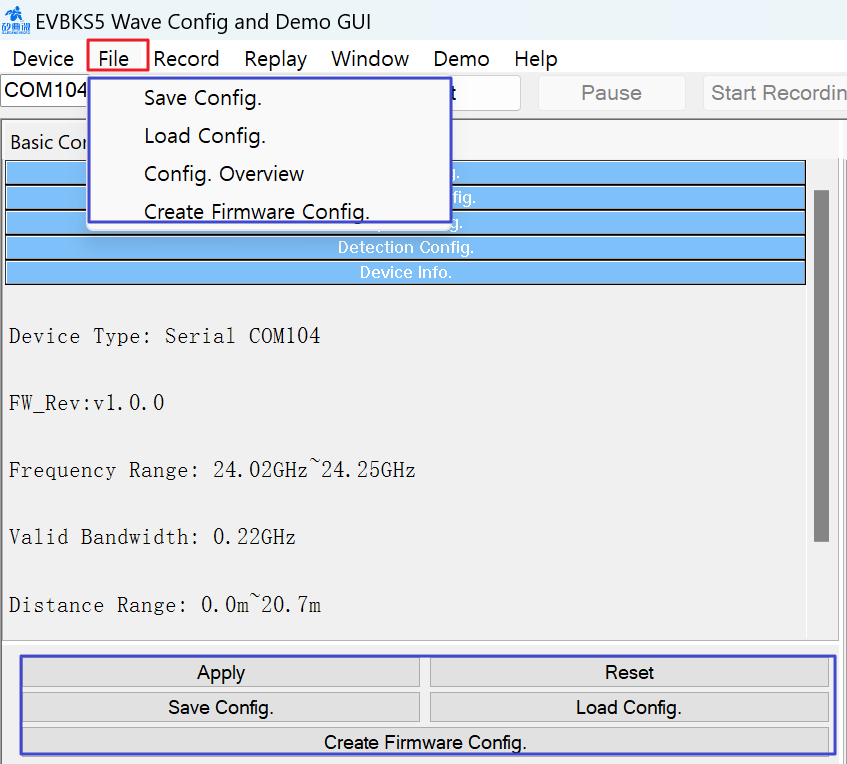
1. Radar Configuration File ( .ini) for GUI
| Button or File Menu | Description |
| Apply |
To apply the current settings in the GUI. Note: It update the file “Radar_Config.ini” with the current settings in GUI. |
| Reset |
Restore the parameters in the Basic Configuration tab to default settings, Note: It update the file, Radar_Config.ini with the default settings. |
| Save Config. | To save the current settings in a file( .ini). |
| Load Config. | To load the configuration file( .ini) from a specified directory. |
2. Radar Configuration File ( .txt) for Host MCU FW
| Button or File Menu | Description |
| Create Firmware Config | To save the list of the register address and values to a txt file. |

Radar Sensor SoC & Module

WiFi IoT Module

5G/LTE/CAT-M1/NB-IoT

WiSUN/HaLow/Thread Module
